
Jai Club Common Registration Mistakes and How to Avoid Them
Most registration issues are preventable. This guide covers mistakes to avoid when creating a Jai Club account.
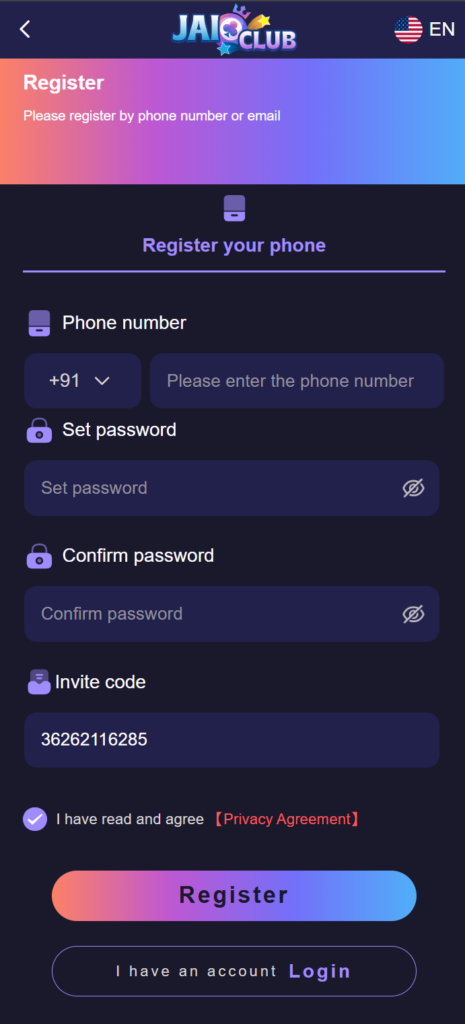
The Jai Club registration form is short: a mobile number, a password entered twice, an optional invite code and a tick box for the terms. Because it is short, people rush it, and the mistakes made in those thirty seconds are the ones that cause trouble weeks later, when a reset code goes to the wrong number or a withdrawal name does not match.
This page goes through the form field by field. If the form is already showing an error message, the companion article on registration form errors explains what each message means.
Filling in the form the right way
- Enter your own mobile number.
- Create a password you can store securely.
- Add referral codes before submitting if you have one.
- Read and accept terms only after reviewing them.
- Complete verification promptly.
Field-by-field: the mistake and what it costs later
- Mobile number: using a number that is not yours. Every reset and verification code goes to this number. If it belongs to a friend or relative, they control your account recovery, not you.
- Mobile number: a temporary or soon-to-expire SIM. When the number is recycled, you lose the only route for resetting the password.
- Password: reusing one from another site. A leak anywhere else then opens this account too.
- Confirm password: pasting the same typo twice. Type it the second time, or show both fields before submitting.
- Invite code: leaving it for later. The code is read once, at registration. It cannot usually be added afterwards.
- Invite code: typing a gift code here. They are different things. A gift code is redeemed inside the account after you have signed up.
- Terms tick box: skipping the age line. The platform is for adults aged 18 and over, and accounts that fail an age check can be closed.
One person, one account
Registering again because you forgot a password, or opening a second account to claim a new-member offer twice, is the mistake with the worst outcome. Duplicate accounts are against the usual platform terms and can lead to both being restricted. If the form says the number is already registered, recover that account instead; you will find the steps in the password reset guide.
Details that must match later
Registration is only the first of three places where your details appear. The second is your profile and the third is the bank or UPI account you save for withdrawals. Use your real name in the same spelling as on your bank account from the start. A mismatch is one of the common reasons a verification or withdrawal request is sent back, and it is far easier to get right once than to correct through support. The profile setup guide shows where each detail is entered.
Straight after you register
- Sign out and sign in again once, to prove the password you saved is the one the account accepted.
- Save the login in a password manager.
- Note your account ID from the profile screen.
- Look around before adding money. The free Wingo practice demo on this site shows how a round works without any payment.
Registration checklist
- Do not use someone else's number.
- Do not create duplicate accounts.
- Avoid typos in mobile numbers.
- Save login details securely after registration.
Members who have just read about registration mistakes usually continue with completing identity checks, the KYC document checklist and keeping profile details current. New members can open an account from the Jai Club register section. Other account topics are a tap away on the start page.
Frequently Asked Questions
Can I register on Jai Club with someone else's number?
You should not. Verification and reset codes go to the registered number, so whoever holds that SIM controls access to the account.
Can I add an invite code after registering?
Usually not. The invite code field is read during registration only, so enter it before you submit the form.
Can I change my registered mobile number later?
That is handled through customer care, not from the form, and you will be asked to prove ownership. Register with a number you expect to keep.
Is one person allowed two Jai Club accounts?
No. One account per person is the normal rule, and duplicates can be restricted. Recover an old account instead of creating another.