
Jai Club Registration Form Errors: 'Already Registered' & More
A sign-up form that refuses to go through is almost always telling you one specific thing. Here is what the common Jai Club registration errors mean and what to do about each one.
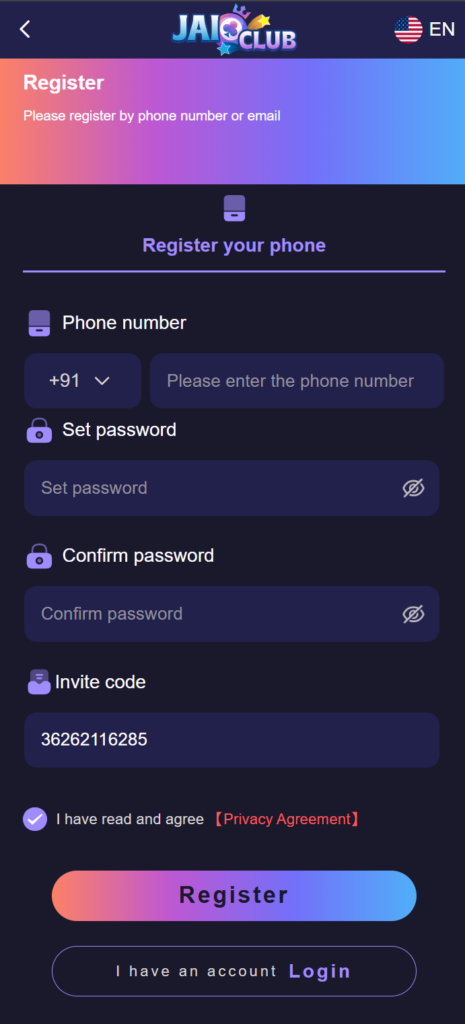
When the Jai Club registration form will not let you through, the message on screen nearly always points to one thing: a number that already has an account, a password the form will not accept, a problem with the invite code field, or a page that stalls when you tap Register. Each has a different fix, and only one of them is ever solved by trying again. This guide on the Jai Club platform goes through what each error means and what to do next.
If you have not started the form yet, the step-by-step registration walkthrough covers the basics for a first session, from the Register button to your first login. This page picks up where that one leaves off, at the moment something goes wrong. Problems with the one-time code itself are a separate topic and are not covered here.
'Mobile number already registered': recover instead of re-registering
Your mobile number is your account identifier, so the form checks it before anything else. If that number is already linked to an account, registration stops. This is the most common sign-up error, and it usually means one of three things:
- You registered before and forgot, perhaps months ago, on another phone or in the browser rather than the app.
- The number was mistyped or autofill dropped in a number you used once before, which happens to have an account.
- The number belonged to someone else first. Recycled SIM numbers occasionally arrive with an account already attached.
In the first two cases the fix is to recover the account, not to create a new one. Check the number digit by digit first; if it is right, go to the login screen and use Forgot Password with the same number. The reset steps are set out in the companion guide. Once you are in, your balance and history are exactly as you left them.
If you are certain you have never registered and the number was recently issued to you, do not try to work around it with a different number. Contact customer care through the official support page, explain that the number is new to you, and keep proof that the SIM is in your name ready in case they ask.
Password rules the form rejects
If the form highlights the password field or says the password is invalid, it is checking your entry against the length and character rules shown on the registration screen. Read the hint under the field carefully, because those are the rules the form actually enforces. The usual reasons a password is turned down:
- it is shorter than the minimum the form asks for;
- it is missing a type of character the hint requires, such as a number or a letter;
- it contains a space, an emoji or a symbol the field does not accept, often added by a keyboard suggestion;
- the confirm-password box does not match exactly, including capital letters.
Type the password slowly with autocorrect off, or paste it from a password manager into both boxes. Avoid reusing a password from another site, and avoid your mobile number or date of birth. Store it somewhere safe before you submit, because the next time you need it will be your first login.
Invite code field errors
The invite or referral code field links your new account to the member who shared the code. If the form says the code is invalid, check these points:
- Copy it, do not retype it. Codes can mix letters and digits, and O and 0, or I and 1, are easy to confuse.
- Remove extra spaces. A space copied before or after the code is enough to make it fail.
- Ask the sender to check it. They can see their own invite code in their account; a code passed along through several chats may have been altered on the way.
- Read the form. Whether the field is optional or required is shown on the registration screen itself. If it is optional and the code still fails, you can leave it empty and register without one.
Be wary of strangers who post invite codes with promises attached. A code only links two accounts. It is not a password, a gift code or a shortcut to winnings, and nobody needs your login details to give you one.
Form freezes or reloads on submit
Sometimes there is no error at all: you tap Register and the button spins, the page reloads to an empty form, or nothing happens. That points to the connection or the browser rather than your details. Work through these in order:
- Tap once and wait. Tapping Register repeatedly can send the form more than once, and the second attempt may report an error even though the first one succeeded.
- Switch networks. Move from Wi-Fi to mobile data or the other way round, then reload the page.
- Clear the site's cache in your browser settings, or open the form in a normal rather than private tab.
- Turn off data savers and ad blockers for the page, since they can block the request the form sends.
- Try the other route. If the app form stalls, try the mobile browser, and the reverse.
Before you start again, try logging in with the number and password you just entered. If the account was created on the first attempt you will go straight in, and filling the form again would only bring back the 'already registered' message.
One person, one account: why duplicate sign-ups get blocked
The registration form is deliberately strict about duplicates. Each mobile number can hold one account, and the platform expects one account per person. That protects you as well: your wallet, withdrawals and saved bank details sit in one place that only your number can recover.
Opening a second account with another number to get round an error, or to claim a new-member offer again, tends to create the very problems it was meant to avoid. Accounts that look like duplicates can be held for review, and a withdrawal can wait until the question is settled. If an error is stopping you, recovering the existing account or asking customer care is the faster route.
18+ only. Jai Club is a real-money gaming platform for adults. Every round is a game of chance and nothing here is a way to guarantee a win. Play only with money you have set aside for entertainment; deposit limits and self-exclusion are explained on the responsible-play page.
Frequently Asked Questions
Why does Jai Club say my mobile number is already registered?
Because that number is already linked to an account. Most often it is an account you opened earlier and forgot about. Use Forgot Password on the login screen with the same number to get back in, rather than registering again.
Can I register a second Jai Club account with another number?
The platform expects one account per person, and duplicate accounts can be held for review. If you cannot get into your first account, recover it with a password reset or ask customer care instead of opening another one.
Do I need an invite code to register?
The registration form shows whether the invite code field is optional or required. If you have a code, copy it exactly without spaces. If the field is optional and the code keeps failing, you can register without it.