
Jai Club UPI Deposit Guide for Quick Wallet Top-Ups
UPI is a fast deposit option for many members. This guide explains the flow from payment screen to wallet confirmation.
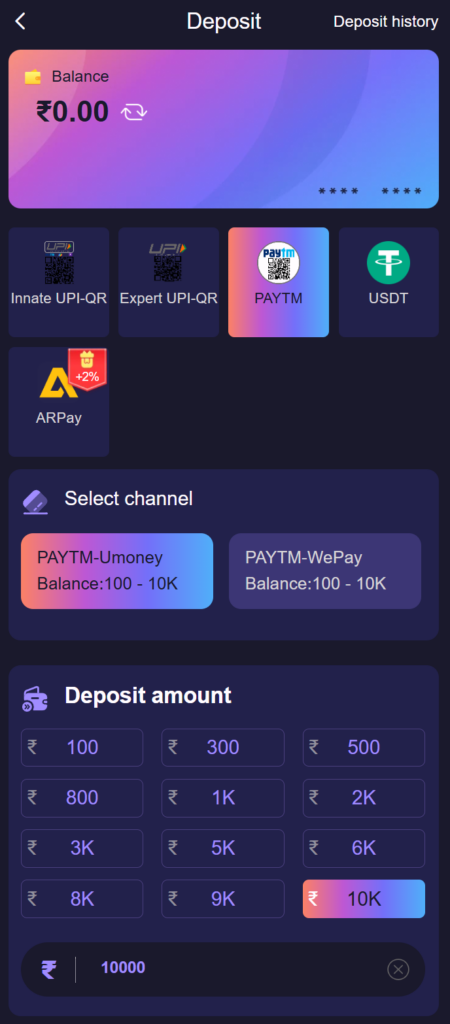
A UPI deposit has two halves that happen in two different apps. Jai Club creates a payment order and shows you a QR code or a UPI ID; your UPI app then sends the money and gives you a reference number. The wallet is credited when the platform matches the two. Nearly every delayed deposit is a mismatch between those halves, so this guide concentrates on getting them to line up.
One clarification: the Android app on Google Play, Jai Club: Colors & Numbers, is a free colour game played with virtual coins. Virtual coins are not money, so nothing in this article applies inside that app. The steps here are for the wallet in your web account.
Making a UPI deposit
- Open Wallet and choose Deposit.
- Select UPI as the payment method.
- Enter the amount within the displayed limits.
- Complete payment through your UPI app.
- Return to Jai Club and wait for wallet confirmation.
What you see on each screen
- Deposit page: the available channels and the limits for each. The minimum and maximum shown here are the ones that apply to you, so read them instead of relying on what someone else paid.
- Payment order: an order number, the exact amount, a countdown and either a QR code, a UPI ID or a button that opens your UPI app.
- Your UPI app: the payee name, the amount and your PIN prompt. Check that the amount matches the order to the rupee before you enter the PIN.
- Success screen in the UPI app: a reference number, usually 12 digits and labelled UTR or UPI Ref No. This is the number that proves the payment.
- Back in your account: the order moves from pending to completed and the balance changes.
Mistakes that delay a UPI credit
- Paying after the countdown has ended. An expired order cannot be matched. Start a new order instead.
- Reusing a QR code or UPI ID from an earlier deposit. Payee details can change between orders, so always pay the one shown on the current order.
- Sending a different amount. Rounding up or down breaks the match.
- Paying twice because the first attempt looked stuck. Check the transaction list in your UPI app before retrying.
- Paying from another person's UPI account. Use an account in your own name, the same one you intend to withdraw to.
Money left the bank but the wallet did not change
First look at the status in your UPI app. If it says pending or processing, the bank has not finished and there is nothing for the platform to credit yet; pending UPI payments either complete or are reversed by the bank. If it says successful, open the deposit record in your account, note the order number, and contact customer care from inside your account with the order number, the UTR and a screenshot of the success screen. Do not send a second payment to "push" the first one through. The transaction reference guide shows where each number is found.
A scam that targets UPI users
You never need to enter your UPI PIN to receive money, and you never need to approve a collect request to "verify" an account. Anyone who sends a collect request claiming to be support, or who asks you to pay a small amount to release a deposit, is taking money from you. Decline the request and report the account inside your UPI app.
UPI deposit checklist
- Use your own UPI account.
- Do not close the payment app before confirmation.
- Save the UPI reference number.
- Contact support if credit is delayed beyond the stated window.
To keep UPI top-ups tidy, it helps to know about topping up straight from your bank account, checks before the first deposit and tracking your wallet balance. Login, registration and gift codes are all reachable from https://jaiclub-lottery.com.
Frequently Asked Questions
How do I deposit on Jai Club with UPI?
Open Wallet, choose Deposit, pick a UPI channel, enter an amount within the limits shown and pay the order from your UPI app before the countdown ends.
What is the minimum UPI deposit on Jai Club?
The minimum and maximum are shown on the deposit page for each channel and can change, so this site does not quote a figure. Use the limits displayed in your own account.
Where do I find the UTR number for my deposit?
Open the payment in your UPI app's transaction history. The reference is shown on the details screen, usually as a 12-digit UTR or UPI reference number.
My UPI payment succeeded but the balance did not update. What now?
Do not pay again. Contact customer care from inside your account with the order number, the UTR and a screenshot of the successful payment so it can be matched.
Can I deposit from a friend's UPI account?
Use your own. Payments from an account in a different name are harder to match and can cause problems when you later withdraw.